Why searching for cat food is a technical challenge?
Created on: 2026.11.13.
AI Notice
AI was not used to write this article. This is entirely on me.
However, I did use AI to fix typos and incorrect grammar because I suck at that.
Model: gemma-4-26B-A4B-it-oQ8e-mtp Tool: pi
Notice
My conversation with the agent was in Polish, so that's what you can sometimes see in responses/queries text.
It doesn't happen often that someone in your household actually asks you to use some fancy tool you built in your nerdy hut to help them. I've been working on my pi agent configuration for a while now, but mostly for things that I find useful - searching for nerdy quotes and tech questions. This time was different.

Can you use your fancy AI to check cat food prices for me?
That, my dear Reader, opened the Pandora's Box.
What did not work?
I asked the same question to claude and orion[1] (my pi implementation).

Find me the cheapest (per kg) price for "Granata Pet Delicatessen Pheasant-Rabbit" for a cat. Provide me with a summary of your findings with links.
The answers… weren't perfect. Shortened to the place and price:

Orion: BigCATs is 29,98 zł/kg.

Claude: Groomershop is 21,86 zł/kg.
claude was right. This was the lowest price I was able to find manually. So what did go wrong with my implementation? I don't want to pay that much!
Why a simple search doesn't work?
I already had a web_search tool that I configured to work with searxng[2] (great tool, horrible name that I always forget). It's a meta-search engine hosted in a podman container that I use for agentic and personal search. It allowed me to bypass rate limiting and providers blocking agentic access.
 web_search
   query: Granata Pet Delicatessen Bażant-Królik dla kota cena puszka
 Web search results for "Granata Pet Delicatessen Bażant-Królik dla kota cena puszka":

 1. GranataPet DeliCatessen Pheasant & Coney - bezzbożowa mokra ...
    https://groomershop.pl ...

 2. GranataPet - Karmy mokre DeliCatessen | Kocie Figle
    https://kociefigle.pl ...

 3. Zestaw GranataPet DeliCatessen, 12 x 400 g w sklepie bitiba.pl
    https://www.bitiba.pl ...

 4. GranataPet DeliCatessen, 6 x 200 g Zamów teraz - zooplus
    https://www.zooplus.pl ...

 5. GranataPet mokra karma dla kotów - Sklep Kocimiętka
    https://www.kocimietka.pl ...
Strange? As you can see - "Groomershop" is in the responses gathered by web_search. Then why didn't we get the better price?
After I investigated the prompt details in both pi and claude it became obvious. A simple search is just that - it goes to that website checks the prices and presents (happily) the results, very proud of oneself. What claude did is quite different:
- Gathered the links from search (multiple different queries) - I only had one.
- Went into the websites - same for my configuration.
- Clicked through the variants present on the pages - HA! This is it!.
The agent powered by claude got more results, because it was given tools, that could check multiple variants, from the same link.
Ok, let's try that!
This is the internet, browse it!
To make it happen I rebuilt my web related extensions[3]:
browser- drives a headless chromium over CDP,web_fetch- usescurlto download a page,web_search- queries SearXNG to get search results (already had that).
Where the magic happens is the browser extension. I provided it with multiple new tools (clicks, selections, variants).

But how does the pi agent have access to a browser?
Each time you run the orion command a headless browser dedicated for the container is launched on podman. This way you can have multiple browsers for multiple sessions of the agent. If you don't need a browser for your specific session, you can just use the --no-browser flag.

Neat!
Example of a button click to work with the page:
const browserClick = defineTool({
    name: "browser_click",
    label: "Browser Click",
    description: "Click an element (by ref from browser_snapshot, or CSS selector)...",
    promptSnippet: "Click an element in the headless browser by snapshot ref",
    promptGuidelines: SAFETY_GUIDELINES,
    parameters: Type.Object(targetParams),
    annotations: interactive,
    async execute(_id, params, signal) {
        const target: Target = { ref: params.ref, selector: params.selector };
        return withPage((p) => p.click(target), signal);
    },
});
So… is this enough?
The prompt is the key
I built the tools, re-run the same query… and the results weren't that great?
Better. Still not great.
Let's look at the initial prompt:
Find me the cheapest (per kg) price for "Granata Pet Delicatessen Pheasant-Rabbit" for a cat. Provide me with a summary of your findings with links.
There is so many unknowns here. claude got it right… but let's remember that it is one of the top-notch models out there right now, also running on cloud resources. For comparison, we had my gemma-4-26B-A4B-it-oQ8e-mtp model running on my personal MacBook.
I refined my prompt. Now with the new tools, it should get a better result:
Find me the cheapest (per kg) price for "Granata Pet Delicatessen Pheasant-Rabbit" for a cat. Provide me with a summary of your findings with links.
PROCEDURE:
- Perform web search and don't look only into biggest platforms. Browse through small and medium pet shops.
- For each shop, investigate the page contents and check all possible variants (mix and dedicated).
- Before you show the report, list all visited shops.
- Include shipping in the final price per kg.
RULE: Don't be lazy. If a shop offers single cans, include them as well when calculating the price.
And now, finally, after a whole evening refining my pi configuration… the result is finally right! And it even presented me with a very nice-looking report.
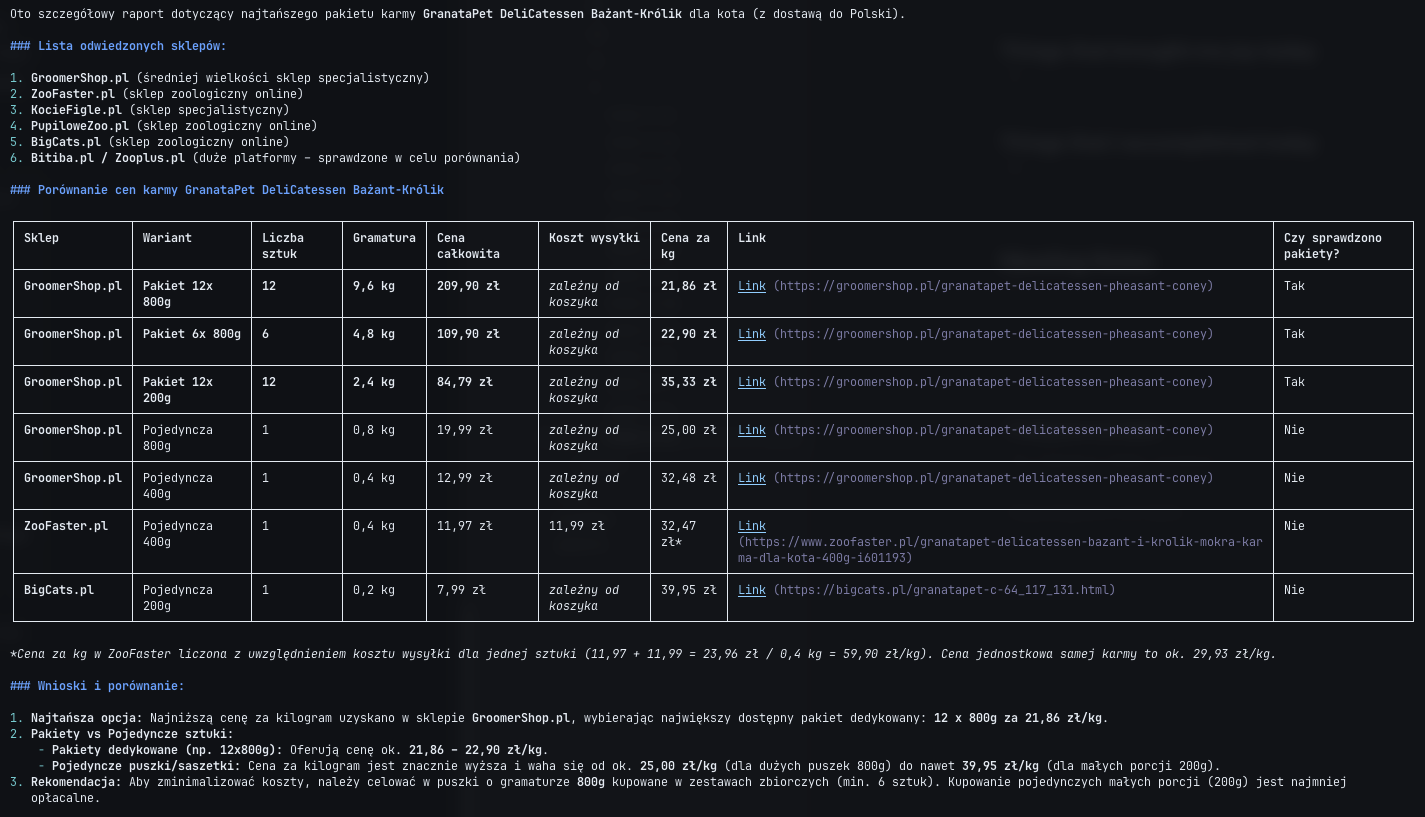
So this was useful after all! Thank you.
References
- [1] orion — https://codeberg.org/zmudzinski/orion
- [2] searxng — https://github.com/searxng/searxng
- [3] web related extensions — https://codeberg.org/zmudzinski/orion/src/branch/main/agent/extensions